> For the complete documentation index, see [llms.txt](https://h4cker404.gitbook.io/blog/llms.txt). Markdown versions of documentation pages are available by appending `.md` to page URLs; this page is available as [Markdown](https://h4cker404.gitbook.io/blog/writeups/how-i-landed-my-first-reflected-xss-in-a-popular-vdp.md).
# How I Landed My First Reflected XSS in a Popular VDP!
Hello mates,\
This is my **first write-up** about the **first Reflected XSS (RXX)** I discovered in a **popular VDP program**. Excited to share the details — let’s dive in!
{% hint style="info" %}
This write-up highlights the importance of **choosing the right subdomain** when hunting for injection-based vulnerabilities like **Reflected XSS (RXSS)**. Many hunters focus on the **main domain**, but weaker security often lies in **less obvious subdomains**.
By targeting one with **relaxed security**, I found an **RXSS vulnerability** that could have been missed on the main site. Here’s how I did it :))
{% endhint %}
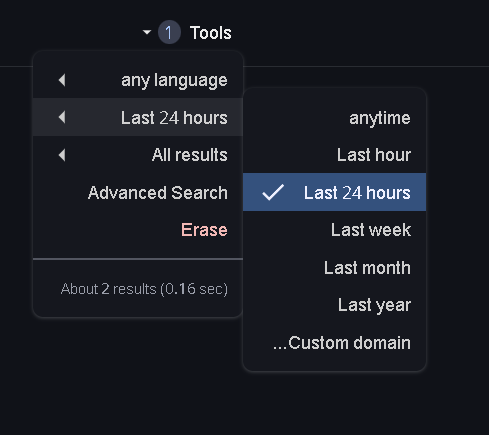
At first, I was looking for the **latest subdomains**, and one of the easiest ways to do that is **Google Dorking**. By using the dork:
```
site:*.target.com/ -www
```
and then adjusting **search tools** to filter results by the **latest dates**, I was able to uncover **newly indexed subdomains** that might have weaker security measures.
And so, I found a **suitable subdomain** with a **search input** that didn’t filter user input properly. It seemed to reflect the input inside a JavaScript context like this:
```html
```
This indicated a **Reflected XSS vulnerability**, as I could inject arbitrary JavaScript into the page.
So, I used the following payload to bypass the filters and trigger the **XSS**:
```html
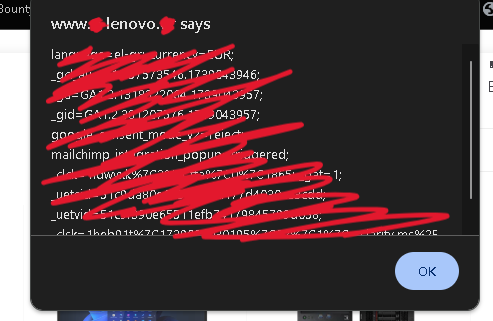
'});alert(document.cookie);
```
This successfully executed in the browser, confirming the **Reflected XSS vulnerability :))**
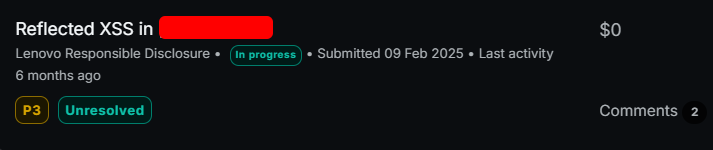
Unfortunately, I didn’t get a bounty since it was a **VDP** (Vulnerability Disclosure Program).
Press enter or click to view image in full size
See you soon! Hope you found this write-up useful. More vulnerabilities coming soon, so stay tuned! Don’t forget to support, share, and follow me on [Twitter](https://x.com/Ahmed78752911). Thanks for reading!
---
# Agent Instructions
This documentation is published with GitBook. GitBook is the documentation platform designed so that both humans and AI agents can read, navigate, and reason over technical content effectively. Learn more at gitbook.com.
## Querying This Documentation
If you need additional information that is not directly available in this page, you can query the documentation dynamically by asking a question.
Perform an HTTP GET request on the current page URL with the `ask` query parameter, and the optional `goal` query parameter:
```
GET https://h4cker404.gitbook.io/blog/writeups/how-i-landed-my-first-reflected-xss-in-a-popular-vdp.md?ask=&goal=
```
`ask` is the immediate question: it should be specific, self-contained, and written in natural language.
`goal` is optional and describes the broader end goal you are ultimately trying to accomplish on behalf of the user. GitBook uses it to tailor the answer towards what is most useful for that goal.
The response will contain a direct answer to the question and relevant excerpts and sources from the documentation.
Use this mechanism when the answer is not explicitly present in the current page, you need clarification or additional context, or you want to retrieve related documentation sections.